You’re Using AI Agents Wrong: How Simplicity Lets You Ship Faster and Scale Reliably
Why structured outputs and if statements beat most autonomous agents in production.
Everyone’s building AI agents in 2025. Venture capitalists are throwing money at “autonomous AI workflows.” Enterprise software vendors are slapping “agentic” labels on everything. Analysts predict 40% of enterprise applications will integrate task-specific AI agents by end of 2026, and the media won’t stop declaring 2025 as “the year of the AI agent”.
Here’s what nobody wants to tell you: most of these “agents” are solving problems that don’t exist, introducing complexity that kills reliability, and burning money that could’ve been saved with basic programming.
I’ve spent the last five years building production AI systems (right now it’s Nextvisit AI) that process thousands of requests daily. We push updates every single day. Over 6,000 commits in 12 months. I’ve been developing for the last 15 years and it keeps coming back to the same thing: fancy autonomous agent architecture almost never works as well as simple, boring solutions.
The Reliability Problem Nobody Talks About
Here’s some math that should terrify anyone building multi-step AI agents.
If each step in your agent workflow has 95% reliability (which is optimistic for current LLMs), your success rate over 20 steps drops to just 36%. Think that’s bad? Even if you magically achieve 99% per-step reliability, you still only get 82% success over 20 steps.
Production systems need 99.9%+ reliability. Your users expect things to work. Every time.
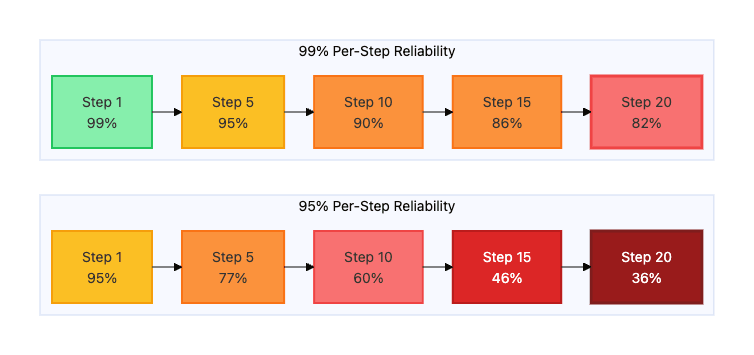
Want to know something uncomfortable? Some engineers question whether AI agents are “all that different from just orchestration” that programmers have been doing forever. We’ve rebranded workflow management as “agentic AI” and convinced ourselves we’ve invented something revolutionary.
What Structured Outputs Actually Look Like
Before you build an elaborate agent system with planning, reasoning, and tool use, try this: tell the AI exactly what format you want, and make it physically impossible for it to give you anything else.
Models like Anthropic’s Opus 4.1 and Sonnet 4.5 support structured outputs natively. You define a JSON schema, and the model MUST return data matching that structure. No parsing, no “I hope this works.”, just your guaranteed valid JSON.
Here’s what a beginner needs to know: Structured outputs mean you define a template (called a JSON schema) that describes exactly what data you want back. The AI can’t deviate from this template, so you never get surprises.
Quick Test in Your Terminal
First, grab an API key from OpenRouter (takes 30 seconds, supports hundreds of models; alternatively use Helicone).
Test it out:
# Set your API key
export OPENROUTER_API_KEY="your-key-here"

# Quick test - generate structured user data
curl https://openrouter.ai/api/v1/chat/completions \
  -H "Authorization: Bearer $OPENROUTER_API_KEY" \
  -H "Content-Type: application/json" \
  -d '{
    "model": "anthropic/claude-sonnet-4.5",
    "messages": [
      {
        "role": "user",
        "content": "Extract info: John Smith is 45 years old, works as a software engineer"
      }
    ],
    "response_format": {
      "type": "json_schema",
      "json_schema": {
        "name": "user_info",
        "strict": true,
        "schema": {
          "type": "object",
          "properties": {
            "name": {"type": "string"},
            "age": {"type": "integer"},
            "occupation": {"type": "string"}
          },
          "required": ["name", "age", "occupation"]
        }
      }
    }
  }'
You get back perfectly structured JSON every single time:
{
  "name": "John Smith",
  "age": 45,
  "occupation": "software engineer"
}
Zero parsing errors. Zero “the AI put the data in a different field.” Zero debugging why your agent decided to format things differently this time.
This solves maybe 60% of the problems people are building agents for. Seriously.
Example: Medical Note Generation
Let’s say you’re building a clinical documentation system. You need patient notes in a specific format. Here’s your schema:
{
    "type": "object",
    "properties": {
        "patient_name": {
            "type": "string",
            "description": "Full name of the patient"
        },
        "chief_complaint": {
            "type": "string",
            "description": "Primary reason for visit"
        },
        "assessment": {
            "type": "string",
            "description": "Clinical assessment of patient condition"
        },
        "plan": {
            "type": "string",
            "description": "Treatment plan and next steps"
        },
        "medications": {
            "type": "array",
            "items": {
                "type": "object",
                "properties": {
                    "name": {"type": "string"},
                    "dosage": {"type": "string"},
                    "frequency": {"type": "string"}
                },
                "required": ["name", "dosage", "frequency"]
            }
        }
    },
    "required": ["patient_name", "chief_complaint", "assessment", "plan"]
}
Now make your API call:
import os
import requests

def generate_medical_note(patient_info):
    response = requests.post(
        "https://openrouter.ai/api/v1/chat/completions",
        headers={
            "Authorization": f"Bearer {os.environ['OPENROUTER_API_KEY']}",
            "Content-Type": "application/json"
        },
        json={
            "model": "anthropic/claude-sonnet-4.5",
            "messages": [
                {
                    "role": "user",
                    "content": f"Generate a medical note for: {patient_info}"
                }
            ],
            "response_format": {
                "type": "json_schema",
                "json_schema": {
                    "name": "medical_note",
                    "strict": True,
                    "schema": medical_note_schema
                }
            }
        }
    )
    return response.json()["choices"][0]["message"]["content"]

# Use it
patient_data = """
Patient John Smith, 45, presents with persistent cough for 2 weeks,
low-grade fever, and fatigue. Physical exam shows slightly elevated
temperature and clear lung sounds.
"""
note = generate_medical_note(patient_data)
print(note)
Output:
{
  "patient_name": "John Smith",
  "chief_complaint": "Persistent cough for 2 weeks with low-grade fever and fatigue",
  "assessment": "Likely upper respiratory infection, possibly bronchitis. No signs of pneumonia on physical exam.",
  "plan": "Symptomatic treatment with rest and fluids. Follow-up in 5 days if symptoms worsen. Consider chest X-ray if no improvement.",
  "medications": [
    {
      "name": "Dextromethorphan",
      "dosage": "20mg",
      "frequency": "Every 6 hours as needed for cough"
    }
  ]
}
The Bouncer Pattern: Validation Without Complexity
Structured outputs guarantee valid JSON. But they don’t guarantee the content makes sense for your domain. Sometimes the AI hallucinates. Sometimes it misunderstands context. Sometimes it just returns garbage that happens to be valid JSON.
Think of validation like a bouncer at a club. Before you let any AI output into your production system, someone checks: “Is this actually legit?”
Here’s the pattern: use two models instead of one complex agent.

Primary Model: Your heavy hitter (Opus 4.1, Sonnet 4.5, GPT-5.1) generates the complex output.
Validator Model: A smaller, cheaper model (GPT-4.1 Mini, GPT-5 Mini, Gemini 2.5 Flash) acts as your bouncer.
The validator’s job is simple: true or false. “Is this a valid medical note?” “Does this contain the required information?” “Is this actually about the topic we asked for?”
Quick Validation Test:
# Validate some content
curl https://openrouter.ai/api/v1/chat/completions \
  -H "Authorization: Bearer $OPENROUTER_API_KEY" \
  -H "Content-Type: application/json" \
  -d '{
    "model": "oopenai/gpt-4.1-mini",
    "messages": [
      {
        "role": "user",
        "content": "Is this a valid medical note with patient name, complaint, assessment, and plan? Return true/false: {\"patient_name\": \"John Smith\", \"chief_complaint\": \"cough\", \"assessment\": \"URI\", \"plan\": \"rest\"}"
      }
    ],
    "response_format": {
      "type": "json_schema",
      "json_schema": {
        "name": "validation",
        "strict": true,
        "schema": {
          "type": "object",
          "properties": {
            "is_valid": {"type": "boolean"}
          },
          "required": ["is_valid"]
        }
      }
    }
  }'
Python Implementation:
import os
import requests
import json

validation_schema = {
    "type": "object",
    "properties": {
        "is_valid": {
            "type": "boolean",
            "description": "True if content meets all validation criteria"
        },
        "validation_criteria": {
            "type": "object",
            "properties": {
                "is_medical_content": {"type": "boolean"},
                "contains_required_fields": {"type": "boolean"},
                "no_hallucinations": {"type": "boolean"}
            }
        },
        "reason": {
            "type": "string",
            "description": "Explanation if validation fails"
        }
    },
    "required": ["is_valid", "validation_criteria"]
}

def validate_medical_note(note):
    """Use a smaller, cheaper model to validate the note"""
    response = requests.post(
        "https://openrouter.ai/api/v1/chat/completions",
        headers={
            "Authorization": f"Bearer {os.environ['OPENROUTER_API_KEY']}",
            "Content-Type": "application/json"
        },
        json={
            "model": "oopenai/gpt-4.1-mini",  # Cheaper validator model
            "messages": [
                {
                    "role": "user",
                    "content": f"""Validate this medical note against these criteria:
1. Contains patient name
2. Contains chief complaint
3. Contains clinical assessment
4. Contains treatment plan
5. Content is medically relevant (not random text)

Note to validate: {note}"""
                }
            ],
            "response_format": {
                "type": "json_schema",
                "json_schema": {
                    "name": "validation_result",
                    "strict": True,
                    "schema": validation_schema
                }
            }
        }
    )

    return json.loads(response.json()["choices"][0]["message"]["content"])

# Example usage
note = generate_medical_note("Patient with flu symptoms")
validation_result = validate_medical_note(note)

if validation_result["is_valid"]:
    print("Note is valid, saving to database")
else:
    print(f"Validation failed: {validation_result['reason']}")
So, why does this work?
Two focused systems. Each does one thing well. The primary model generates, the validator validates. Simple!
Easy debugging. If something fails, you know exactly where: either generation failed or validation failed. No mysterious agent behavior.
Cost effective. Smaller models for validation are fast and cheap. Haiku 4.5 costs a fraction of what Opus 4.1 costs. You’re not burning money on expensive model calls for simple checks.
No agent complexity. No planning phase. No tool selection. No multi-step reasoning that might fail at step 7 of 20.
When You Actually Need Branching Logic
Sometimes the answer isn’t more AI, sometimes you just need code.
After your validator runs, you have a binary outcome! It’s only either valid or invalid. Here’s where traditional programming shines.
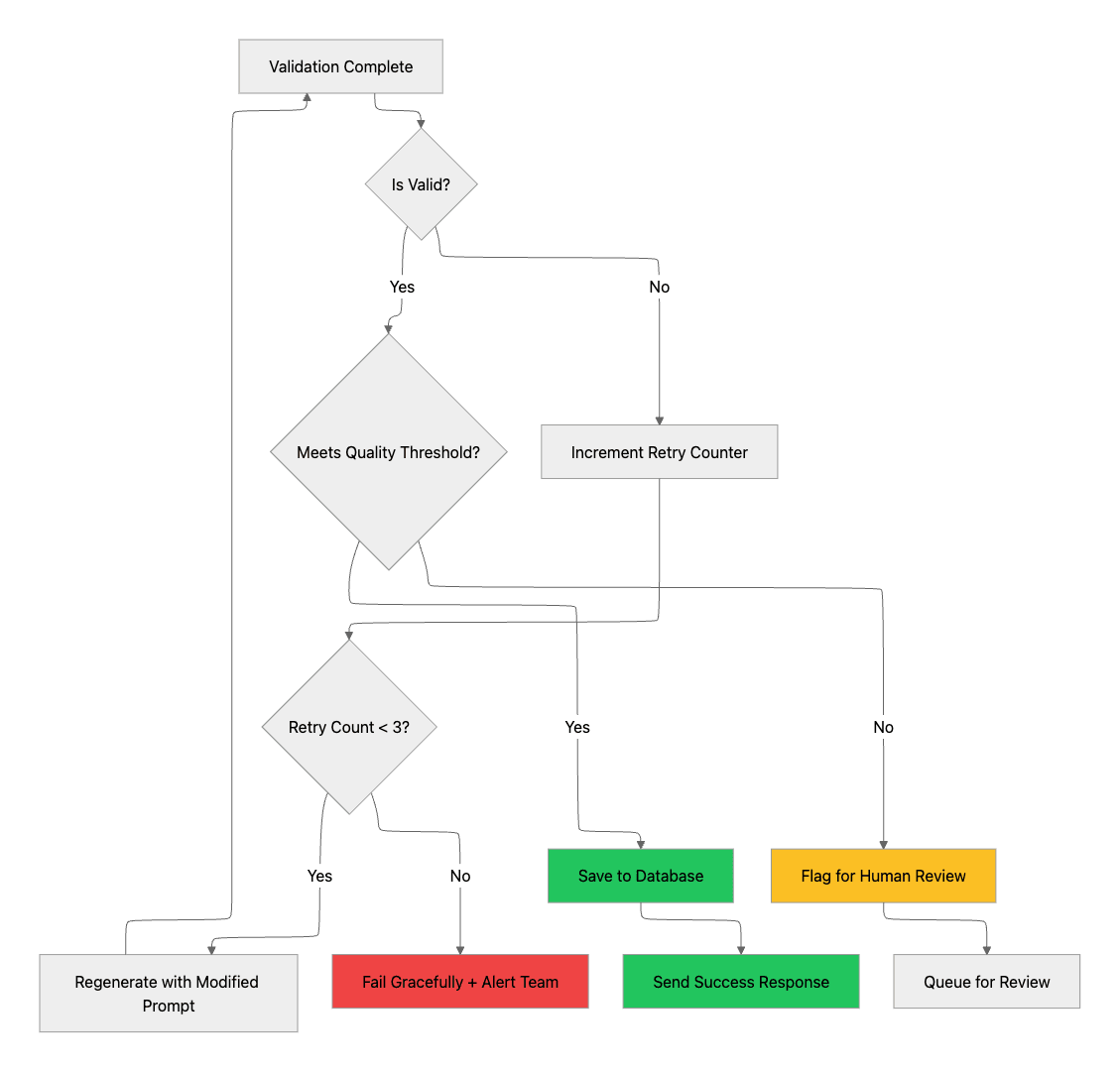
Here’s what this looks like in Python:
import os
import requests
import json
import logging
from typing import Optional

# Setup logging
logging.basicConfig(level=logging.INFO)
logger = logging.getLogger(__name__)

OPENROUTER_API_KEY = os.environ["OPENROUTER_API_KEY"]
MAX_RETRIES = 3

def generate_content(prompt: str, model: str = "anthropic/claude-sonnet-4.5") -> dict:
    """Generate content with primary model"""
    response = requests.post(
        "https://openrouter.ai/api/v1/chat/completions",
        headers={
            "Authorization": f"Bearer {OPENROUTER_API_KEY}",
            "Content-Type": "application/json"
        },
        json={
            "model": model,
            "messages": [{"role": "user", "content": prompt}],
            "response_format": {
                "type": "json_schema",
                "json_schema": {
                    "name": "medical_note",
                    "strict": True,
                    "schema": medical_note_schema
                }
            }
        }
    )
    return json.loads(response.json()["choices"][0]["message"]["content"])

def validate_content(content: dict) -> dict:
    """Validate with smaller model"""
    response = requests.post(
        "https://openrouter.ai/api/v1/chat/completions",
        headers={
            "Authorization": f"Bearer {OPENROUTER_API_KEY}",
            "Content-Type": "application/json"
        },
        json={
            "model": "oopenai/gpt-4.1-mini",
            "messages": [
                {
                    "role": "user",
                    "content": f"Validate this content: {json.dumps(content)}"
                }
            ],
            "response_format": {
                "type": "json_schema",
                "json_schema": {
                    "name": "validation_result",
                    "strict": True,
                    "schema": validation_schema
                }
            }
        }
    )
    return json.loads(response.json()["choices"][0]["message"]["content"])

def save_to_database(content: dict) -> bool:
    """Save validated content to database"""
    # Your database logic here
    logger.info(f"Saving content: {content['patient_name']}")
    return True

def alert_team(message: str):
    """Send alert to monitoring system"""
    logger.error(f"ALERT: {message}")
    # Your alerting logic here (Slack, email, PagerDuty, etc.)

def process_medical_note(patient_info: str) -> Optional[dict]:
    """Main processing logic with retries and validation"""
    retry_count = 0

    while retry_count < MAX_RETRIES:
        try:
            # Step 1: Generate content
            logger.info(f"Generating content (attempt {retry_count + 1})")
            content = generate_content(patient_info)

            # Step 2: Validate content
            logger.info("Validating content")
            validation_result = validate_content(content)

            # Step 3: Branching logic based on validation
            if validation_result["is_valid"]:
                # Content is valid - save it
                if save_to_database(content):
                    logger.info("Success: Content saved to database")
                    return content
                else:
                    logger.error("Database save failed")
                    retry_count += 1
            else:
                # Validation failed - log and retry
                logger.warning(f"Validation failed: {validation_result.get('reason')}")

                # Save failed generation for analysis
                with open("failed_generations.log", "a") as f:
                    f.write(f"{json.dumps(content)}\n")

                retry_count += 1

        except requests.exceptions.RequestException as e:
            logger.error(f"API request failed: {e}")
            retry_count += 1
        except Exception as e:
            logger.error(f"Unexpected error: {e}")
            retry_count += 1

    # Max retries reached
    alert_team(f"Max retries reached for patient info: {patient_info}")
    return None

# Use it
patient_data = "Patient John Smith, 45, with persistent cough"
result = process_medical_note(patient_data)

if result:
    print("Successfully processed note")
else:
    print("Failed to process note after max retries")
That’s the pattern. AI handles the hard part (understanding intent, generating content). Traditional code handles reliability (execution, error handling, state management, rollback).
You maintain full control. You can debug with logs, add monitoring, and modify the flow without retraining anything.
Real Production Architecture
Let me show you how this actually works in a system processing thousands of requests daily.
The Problem
Building clinical documentation for behavioral health providers. Sessions are recorded, audio is transcribed, and we need to generate structured clinical notes automatically.
The Temptation
Build an autonomous agent that analyzes patient conversations, researches medical history, generates comprehensive notes, handles edge cases dynamically, self-corrects errors, and adapts to different providers.
Sounds amazing, but would fail constantly in production.
What Actually Works
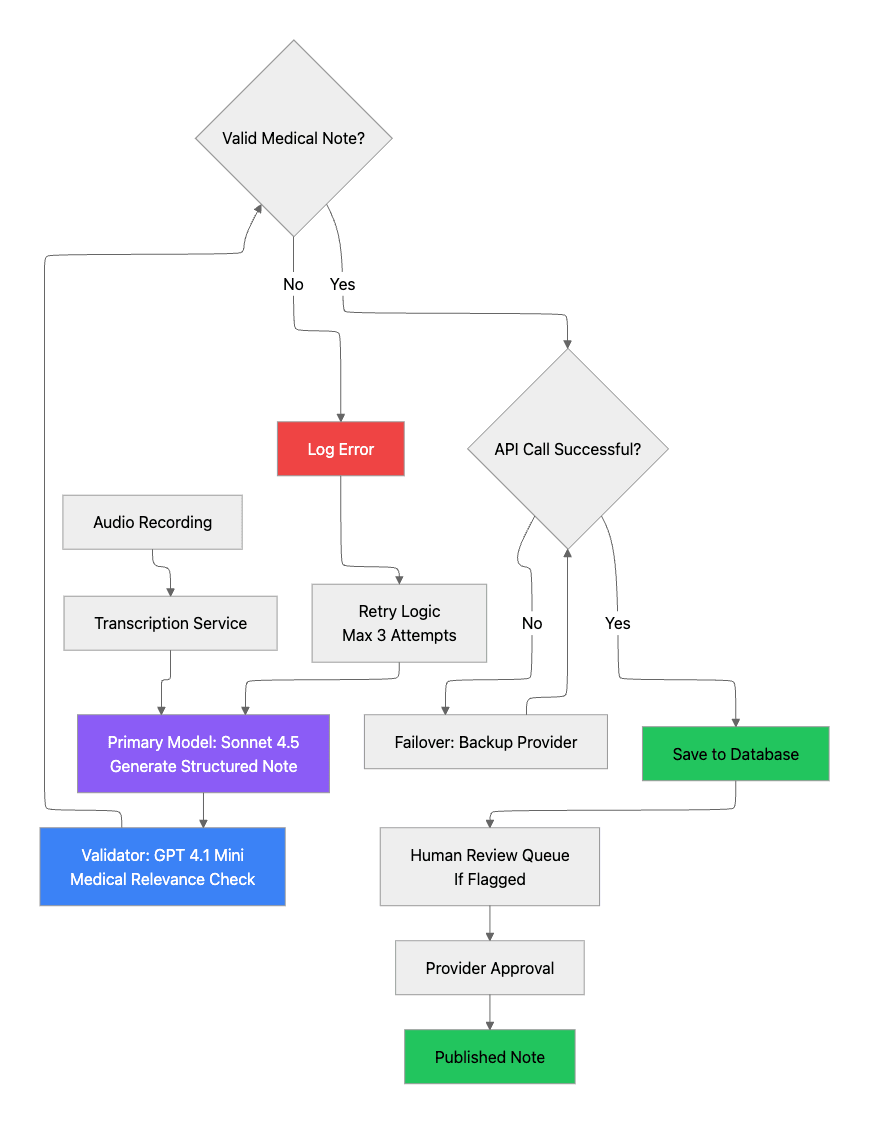
Layer 1: Structured Output (Primary Model: Opus 4.1 or Sonnet 4.5)
Schema defines the exact note format. Eliminates parsing errors entirely.
Layer 2: Validation (Smaller Model: gpt-4.1-mini, gpt-5-nano, etc.)
Simple true/false check. Catches hallucinations without adding complexity.
Layer 3: Branching Logic (Traditional Code)
def process_with_failover(patient_data: str):
    """Process with automatic failover between providers"""

    # Try primary provider (Anthropic via OpenRouter)
    try:
        note = generate_medical_note(patient_data)
        validation = validate_medical_note(note)

        if validation["is_valid"]:
            save_to_database(note)
            logger.info("Success with primary provider")
            return note
        else:
            logger.warning("Validation failed, retrying")
            raise ValueError("Validation failed")

    except Exception as e:
        logger.error(f"Primary provider failed: {e}")

        # Automatic failover to backup provider
        try:
            logger.info("Failing over to backup provider")
            note = generate_medical_note(
                patient_data,
                model="openai/gpt-4.1"  # OpenRouter handles the routing
            )
            validation = validate_medical_note(note)

            if validation["is_valid"]:
                save_to_database(note)
                logger.info("Success with backup provider")
                return note
        except Exception as backup_error:
            logger.error(f"Backup provider also failed: {backup_error}")
            alert_team("Both providers failed")
            return None
Layer 4: Human Oversight
Critical decisions still need human confirmation. Notes flagged by validation go into a review queue. Providers approve before publishing.
Results
- Reliability: Pushing updates daily. System handles thousands of requests without mysterious agent failures.
- Speed: Average note generation under 10 seconds. Validation adds less than 1 second.
- Cost: Validator model costs ~90% less than using the primary model for everything.
- Trust: Customers trust the system because it behaves predictably.
So, we did this with no agents and just good architecture.
When You Actually DO Need Agents
Look, agents aren’t useless! They can solve real problems, but those problems are rarer than the hype suggests.
You might actually need an agent if:
- The problem requires dynamic planning. The steps genuinely can’t be predicted ahead of time. Example: competitive gameplay where strategy adapts to opponent moves.
- You’re doing research synthesis. Gathering information from multiple unknown sources, cross-referencing, and building comprehensive analysis. The path forward changes based on what you discover.
- Failure is acceptable. You’re okay with 60–80% success rates because the upside of success outweighs the cost of failure.
- You have debugging resources. You can afford engineers dedicated to figuring out why the agent decided to do something unexpected at step 14 of a 20-step workflow.
Examples of good agent use cases:
- Advanced code refactoring where the changes needed emerge from analysis
- Scientific research that requires following unexpected leads
- Creative problem-solving where exploration matters more than reliability
Common mistakes (don’t build agents for these):
- Data extraction with structured outputs works better (just use agents to collect the data first if needed!)
- Form filling with traditional automation works better
- Content generation with good prompts and structured outputs works better
- Customer service with decision trees and AI-powered responses at leaves works better
- Anything with clear, predictable steps just use normal code
The Decision Framework
Before you architect an agent system, answer these questions honestly:
Can a single well-crafted prompt with structured outputs solve this? If yes, stop here. You’re done.
Can structured outputs plus validation catch your edge cases? If yes, add the bouncer pattern. Still simpler than agents.
Are your workflow steps genuinely unpredictable? If no, use branching logic. Traditional programming is GOOD at predictable workflows.
Can you tolerate 36–82% reliability for multi-step processes? If no, agents will break your production system.
Do you have resources to debug agent behavior? If no, you’ll waste weeks figuring out why it fails mysteriously.
Are you solving a real problem or following hype? Be honest. FOMO isn’t a technical requirement.
Example: E-commerce Product Descriptions
The pitch: “Build an AI agent that researches competitors, analyzes customer reviews, generates product descriptions, optimizes for SEO, and posts to your site autonomously!”
The reality: You need five separate, simple tools:
# 1. Competitor research - scheduled script (traditional cron job)
def scrape_competitors():
    """Runs weekly via cron"""
    pass

# 2. Review analysis - structured output (one API call)
def analyze_reviews(reviews):
    schema = {
        "type": "object",
        "properties": {
            "themes": {"type": "array", "items": {"type": "string"}},
            "sentiment": {"type": "string"}
        }
    }
    # Single API call with structured output
    return call_api_with_schema(reviews, schema)

# 3. Description generation - structured output (one API call)
def generate_description(product_info, themes):
    schema = {
        "type": "object",
        "properties": {
            "title": {"type": "string"},
            "description": {"type": "string"},
            "bullet_points": {"type": "array"}
        }
    }
    return call_api_with_schema(product_info, schema)

# 4. SEO optimization - rule-based (normal code)
def optimize_seo(description, keywords):
    """Insert keywords based on rules"""
    return description + " " + " ".join(keywords)

# 5. Publishing - API call with human approval (normal workflow)
def publish_to_cms(content):
    if human_approved(content):
        cms_api.publish(content)
Total: Two AI calls with structured outputs with three traditional programming tasks, zero agents, works reliably, and most importantly it’s easy to debug. (Also costs less!)
The Reality of Rising LLM Costs
Let’s talk money! The operating costs of agents remain a concern, with continued model development making it hard to predict cost profiles even 6 months out.
Rough example cost breakdown for 1,000 document processing tasks:
Agent approach:
- Average 15 steps per task
- Each step calls GPT-4.1 or Opus 4.1 class model
- Cost per 1M tokens: ~$15 (input) / $75 (output)
- Average 500 input tokens, 300 output tokens per step
- Cost per task: 15 steps × ($7.50 + $22.50) = $450 per 1,000 tasks
Structured output plus validation approach:
- 1 call to Sonnet 4.5 for generation (1,000 input, 500 output tokens)
- 1 call to Haiku 4.5 for validation (500 input, 50 output tokens)
- Cost: ($15 + $37.50) + ($0.25 + $0.63) = $53.38 per 1,000 tasks
Savings: 88% cheaper. And more reliable.
What Actually Matters in Production
Your users don’t care about your architecture. They care about whether it works.
Things that matter:
- Does it work consistently?
- Is it fast enough?
- Can you debug it when it breaks?
- Can you add features without rebuilding everything?
- Does it stay within budget?
Things that don’t matter:
- Whether you’re using “agentic AI”
- How many autonomous decision points you have
- Whether your system is “cutting-edge”
- What the latest Gartner report says
The gap between “works in demo” and “works at scale” is enormous. Demos can be impressive with 5-step workflows. Production systems need to handle 20+ steps reliably. That’s where simple architectures and long standing approaches win.
Closing Thoughts
We’re in the middle of massive hype around AI agents! Over 78% of mid-to-large enterprises are expected to deploy some form of AI agent by end of 2025. Venture funding is pouring into “fully autonomous” solutions, I’m in “VC land” right now with my startup Nextvisit, and I see this happening everyday.
Most of this will fail.
The systems that succeed will be boring. It’s been like this for awhile and I’ve seen it countless times over the past 15+ years. Structured outputs with clear schemas. Simple validation layers. Good old fashioned if/else statements handling the workflow with human oversight at critical points.
Save agents for problems that genuinely need them, for everything else, keep it simple.
Your future self (and your on-call engineer) will thank you.
Quick Reference: Getting Started with OpenRouter
Setup (30 seconds)
- Go to openrouter.ai
- Sign up and grab an API key
- Export it:
export OPENROUTER_API_KEY="your-key-here"
I personally use Helicone AI Gateway, it has a drop in replacement URL for access to many providers and models just like OpenRouter.
Quick Test
curl https://openrouter.ai/api/v1/chat/completions \
  -H "Authorization: Bearer $OPENROUTER_API_KEY" \
  -H "Content-Type: application/json" \
  -d '{
    "model": "anthropic/claude-sonnet-4.5",
    "messages": [{"role": "user", "content": "Say hello"}]
  }'
Python Setup
import os
import requests

OPENROUTER_API_KEY = os.environ["OPENROUTER_API_KEY"]

def call_api(prompt, model="anthropic/claude-sonnet-4.5"):
    response = requests.post(
        "https://openrouter.ai/api/v1/chat/completions",
        headers={
            "Authorization": f"Bearer {OPENROUTER_API_KEY}",
            "Content-Type": "application/json"
        },
        json={
            "model": model,
            "messages": [{"role": "user", "content": prompt}]
        }
    )
    return response.json()["choices"][0]["message"]["content"]
Models to Try
- Primary generation:
anthropic/claude-sonnet-4.5oranthropic/claude-opus-4.1 - Validation:
openai/gpt-5-mini,openai/gpt-4.1-mini, orgoogle/gemini-2.5-flash - Budget option:
google/gemini-2.5-flash-lite
Want to dive deeper? Check out OpenRouter’s structured outputs documentation. The examples above will get you 80% of the way there.
Citations & Special Thanks
This article draws on research, documentation, and insights from various sources across the AI and software engineering communities. I’m incredibly thankful for the people putting content out there and doing research, so a special thanks to the following:
Industry Analysis & Agent Trends
- IBM Research on AI Agents in 2025 | IBM Think, “AI Agents in 2025: Expectations vs. Reality” | Read more
- Gartner Market Predictions | Gartner Press Release, August 26, 2025 | Read more
Technical Insights & Production Experience
- Utkarsh Kanwat, “Why I’m Betting Against AI Agents in 2025” | Read more
- Jack Vanlightly, “AI Agents in 2025” | Engineering perspectives on agentic systems | Read more
Structured Outputs & Validation
- OpenRouter Documentation | Structured Outputs Feature Documentation | Read more
- Instructor, Semantic Validation Guide | “Understanding Semantic Validation with Structured Outputs” | Read more
Note on Sources: All citations represent the state of knowledge and predictions as of their publication dates. The AI landscape evolves rapidly, and recommendations should be validated against current conditions.
Originally published on Medium, in StartupInsider, on November 24, 2025.